
Reference
Keyboard shortcuts
List of keyboard shortcuts
The same list is available in the app under Settings ▾ → Shortcut List.
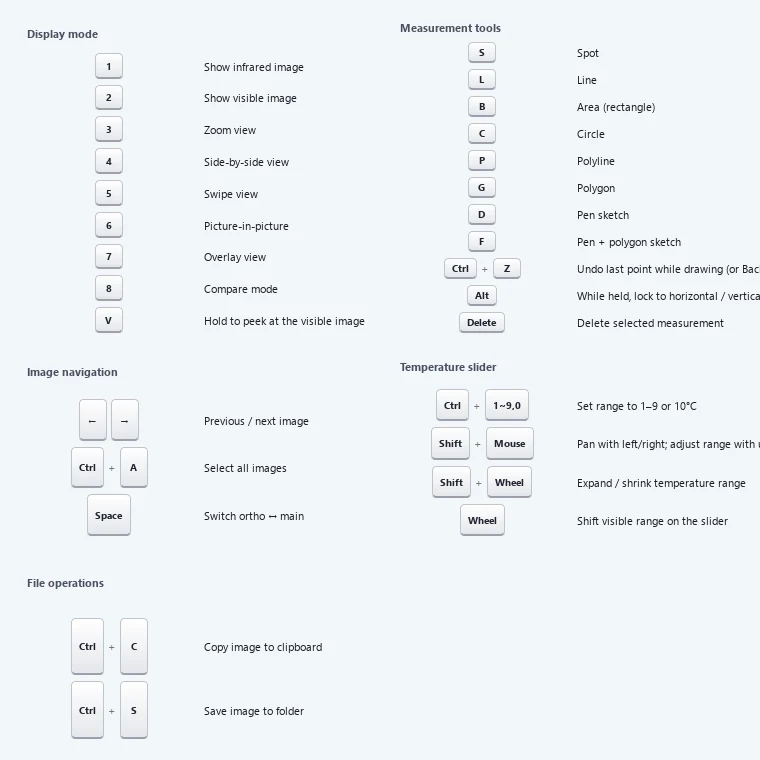
View modes (main viewer)
| Key | View mode |
|---|---|
| 1 | Infrared |
| 2 | Visible Image |
| 3 | Zoom |
| 4 | Side by Side |
| 5 | Swipe |
| 6 | Picture-in-Picture |
| 7 | Overlay |
| 8 | Compare Mode |
Measurement tools
| Key | Tool |
|---|---|
| S | Spot |
| L | Line |
| B | Box |
| C | Circle |
| P | Polyline |
| G | Polygon |
| D | Pen - Line |
| F | Pen - Polygon |
Image and viewer navigation
| Key | Action |
|---|---|
| ← / → | Go to the previous / next image |
| Space | Switch between the main viewer and the ortho viewer |
| V (hold) | Temporarily show the visible image while held (release to return to the previous mode) |
| Ctrl + C | Copy the current view image to the clipboard |
| Ctrl + S | Export the current view image to a folder |
| Ctrl + A | Select all thumbnails in the image list |
Temperature display range
| Key | Action |
|---|---|
| Shift + mouse move | Hold Shift and move the mouse over the image to adjust the temperature display range (no clicking needed). Left/right = slide the range, up/down = widen or narrow it (center preserved) |
| Shift + wheel | Widen or narrow the temperature span (same as up/down movement, center preserved) |
| Wheel over the temperature slider | Slide the display range |
| Ctrl + 0–9 | Apply a temperature span instantly (1–9 = that many °C, 0 = 10 °C, center preserved) |
Measurement drawing
| Key | Action |
|---|---|
| Delete | Delete the selected measurement |
| Enter | Finish the polyline / polygon being drawn |
| Esc | Discard the measurement being drawn (the tool stays selected) |
| Ctrl + Z / Backspace | Undo the last vertex while drawing (polyline / polygon) |
| Alt (hold) | Constrain drawing: horizontal/vertical or parallel/perpendicular to the previous edge for line tools, perfect square/circle for Box/Circle |
Settings
What you can change in Common Settings — image export, temperature mask, type/judgment/part, language, temperature unit, theme and display scale
Supported cameras
Thermal camera models, lenses and image formats that CRITIR can read, including DJI, FLIR, HIKMICRO, Fluke, Skydio, Autel, NEC Avio and testo.